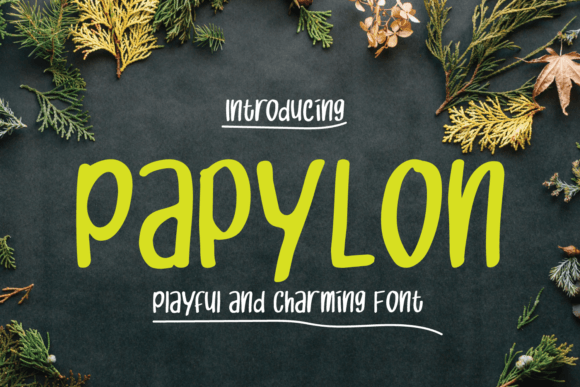
Papylon: A Playful Handwritten Display Font for Modern Designers
Fonts are more than just a visual choice—they’re a functional part of any design or content creation process. Whether you're building a brand identity, crafting social media posts, designing marketing materials, or producing digital assets, the right typeface can make all the difference. Enter Papylon, a charming and expressive handwritten display font that brings warmth, personality, and creativity to your projects. Its unique blend of elegance and whimsy makes it ideal for designers who want to add a human touch to their work without sacrificing professionalism.
What is Papylon and Why It Matters in Your Workflow
Papylon is a modern handwritten display font designed with both aesthetics and usability in mind. Unlike traditional script fonts that may be difficult to read at smaller sizes or in dense text, Papylon maintains clarity while preserving its organic, cursive appeal. This balance allows it to serve as a versatile tool across various stages of a creative project—from initial brainstorming to final presentation.
In the broader context of design workflows, Papylon fits into the early planning and execution phases. It's particularly effective when used alongside other structured tools such as wireframes, mood boards, and typography guides. By introducing a sense of spontaneity and artistry, it helps bridge the gap between rigid layouts and engaging visual storytelling.
When to Use Papylon Before a Project
Before diving into the design phase, many professionals use typography to set the tone of a project. Papylon can be an excellent starting point for ideation sessions, especially when working on branding concepts or content themes that require a personal or artistic flair.
- Brainstorming Sessions: Use Papylon in note-taking or sketching out ideas during meetings. Its playful style encourages creativity and can help spark new directions.
- Concept Boards: Incorporate it into mood boards to highlight key phrases or values that define a brand’s voice, such as “innovative,” “approachable,” or “authentic.”
- Client Presentations: When presenting early-stage designs, using Papylon in headers or taglines can convey a sense of thoughtfulness and originality before finalizing the layout.
Integrating Papylon During the Creative Process
Once a project moves into active development, Papylon can be deployed strategically to enhance user experience and visual hierarchy. Its readability in larger formats makes it well-suited for headlines, banners, and call-to-action buttons where impact matters most.
- Design Layouts: In graphic design software like Adobe Photoshop or Illustrator, pair Papylon with a clean sans-serif or serif font for body text. This contrast ensures legibility while adding character to key elements.
- Web Development: If you're building a website or landing page, consider using Papylon for hero sections, testimonials, or promotional slogans. Make sure to test how it loads and renders across different browsers and devices.
- Email Marketing: For newsletter headers or subject lines, Papylon can create a memorable first impression. Always ensure that it complements the rest of the email design and doesn’t clash with other fonts.
A practical example might involve a blogger creating a new theme for their site. They could use Papylon for post titles and section headings to give their content a handcrafted feel. Meanwhile, they’d keep paragraph text in a standard font to maintain readability. This approach not only elevates the blog’s aesthetic but also improves user engagement by making the content feel more personable and curated.
Working with Papylon After Final Output
After completing a project, the font can still play a role in follow-up activities. Papylon is great for signage, thank-you notes, or even behind-the-scenes content like team acknowledgments or customer feedback highlights.
- Print Materials: Use Papylon in print for invitations, certificates, or branded merchandise like T-shirts or mugs. The tactile quality of printed handwritten fonts often resonates more with audiences.
- Social Media Reels: Add Papylon to motion graphics or animated text in video content. Its fluid strokes animate smoothly, making it perfect for dynamic presentations or story-driven campaigns.
- Personal Projects: Entrepreneurs or hobbyists might find Papylon useful for packaging, labels, or personal blogs. Its charm adds a unique signature to products or platforms aiming to stand out.
Compatibility and Usability Tips
While Papylon is visually appealing, ensuring it integrates well into your tools and systems is essential. Here are some tips for maximizing its usability:
Font Pairing: To maintain a professional look, avoid pairing Papylon with another decorative font. Instead, match it with minimalist options like Montserrat, Open Sans, or Lato. These combinations offer a balanced visual rhythm and help guide the reader’s attention effectively.
Accessibility Considerations: Since Papylon is a display font, it should never be used for body text or small captions. Always reserve it for headlines, logos, or short bursts of information where legibility isn't compromised. For accessibility compliance, provide fallback fonts and ensure sufficient contrast against background colors.
File Formats: Download Papylon in multiple file formats (like OTF, TTF, or WOFF) depending on your platform needs. Web developers will benefit from WOFF2 files due to their optimized performance and cross-browser compatibility.
Organizing Fonts for Long-Term Efficiency
As your font library grows, maintaining organization becomes crucial. Create clear naming conventions for font styles (e.g., "Papylon Bold" vs. "Papylon Regular") and store them in folders categorized by purpose—such as "Display," "Branding," or "Social Media." This system saves time when selecting the right typeface for specific tasks and ensures consistency across projects.
Consider using font management tools like FontBase or Suitcase Fusion to streamline access and testing. These platforms allow you to preview fonts directly within your applications, helping you decide quickly if Papylon is the best fit for a given task.
Real-World Applications and Workflow Examples
Here are a few scenarios where Papylon shines and how it can be implemented effectively:
Scenario 1: Brand Identity Development
A small business owner wants to build a warm and inviting brand for a handmade soap company. They start by researching brand personalities and experimenting with fonts. Papylon is selected for the logo and product names because it feels authentic and aligns with the brand’s artisanal vibe. During the design phase, they pair it with a simple sans-serif for pricing and descriptions. Finally, they include Papylon in their packaging and website headers to maintain a consistent visual language throughout the customer journey.
Scenario 2: Educational Content Creation
An educator is preparing interactive learning materials for students. They choose Papylon for motivational quotes and chapter titles in a course handbook, giving the material a friendly and approachable tone. The same font is later used in slide decks for live lessons, helping to emphasize key takeaways. The teacher also shares these slides online, ensuring that Papylon displays correctly by embedding the font via Google Fonts or Typekit.
Scenario 3: Freelance Graphic Design
A freelance designer is tasked with creating a wedding invitation suite. They use Papylon for the couple’s names and special messages, which adds a romantic and personalized touch. For the rest of the layout—dates, venue details, RSVP instructions—they switch to a classic serif font. The designer also exports the final artwork with embedded fonts to avoid rendering issues when clients view or print the designs.
Ensuring Consistency and Quality Control
Consistency is key in professional design. When using Papylon, establish rules around its application. Define which sizes, weights, and spacing settings work best for each use case. Document these choices in a style guide so team members or future collaborators can follow suit without guesswork.
Quality control involves checking how Papylon looks across different mediums. For example, if you're using it in a mobile app, verify that it scales well on screens of varying resolutions. Similarly, if printing promotional materials, confirm that the font holds up under different paper types and color modes.
Another consideration is licensing. Ensure you have the correct usage rights for commercial versus personal projects. Some versions of Papylon may require additional purchases for web embedding or redistribution.
Maximizing Value Through Strategic Use
Instead of using Papylon in every element of a design, focus on where it can truly elevate the message. Ask yourself:
- Does this element need emotional resonance?
- Will the font distract from the content or reinforce it?
- Is it being used consistently across platforms?
Answering these questions helps prevent overuse and keeps your designs focused. Papylon works best when used intentionally—as a spotlight rather than a floodlight.
Pro Tips for Using Papylon
- Use it sparingly for maximum impact.
- Test it at different sizes to see how it performs.
- Pair it with neutral, high-legibility fonts to avoid visual clutter.
- Embed it correctly in web projects to avoid load-time delays.
- Back it up with alternative fonts in case of technical issues.
Long-Term Integration and Maintenance
For long-term use, consider integrating Papylon into your asset management system. If you're part of a team, set up shared font libraries so everyone has access to the same version. Avoid using outdated or unlicensed copies, which can lead to inconsistencies and legal problems.
Also, revisit your font choices periodically. Trends evolve, and what feels fresh today might become dated tomorrow. However, Papylon’s timeless handwriting style gives it lasting appeal, especially in niches like lifestyle brands, educational platforms, or creative portfolios.
Keep your design systems updated with notes on Papylon’s intended uses and limitations. This documentation helps new team members understand when and how to apply it, reducing the need for repeated training and improving overall efficiency.
Conclusion
Papylon is more than just a stylish font—it’s a strategic tool for creators who value authenticity and visual impact. From early brainstorming to final output and beyond, it can enhance your workflow by adding a layer of personality to your designs. With proper planning, pairing, and implementation, it becomes a reliable part of your typographic arsenal.
Whether you're a marketer, educator, entrepreneur, or designer, incorporating Papylon into your routine can help you stand out in a crowded digital landscape. Just remember to use it wisely, test it thoroughly, and maintain consistency across all platforms and deliverables.