Bootibay: A Playful Display Font for Creative Projects
Fonts play a crucial role in visual communication, and choosing the right one can elevate your design from good to great. Bootibay is a Display font that stands out with its versatility, cuteness, and playful charm. Whether you're designing greeting cards, crafting catchy headlines, or working on branding materials, Bootibay brings a clean yet fun aesthetic that appeals to a wide audience. In this article, we’ll explore what makes Bootibay special and help you avoid common pitfalls when selecting and using it in your projects.
What Is Bootibay?
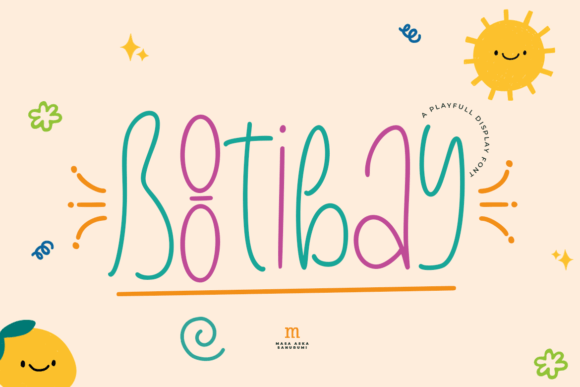
Bootibay is a modern Display font known for its bold personality and friendly appearance. It features rounded edges, whimsical characters, and a balanced structure that makes it both eye-catching and easy to read at larger sizes. This font is ideal for creative applications where you want to add a touch of warmth and character without sacrificing clarity.
Display fonts like Bootibay are typically used for headings, logos, titles, and short texts rather than body copy. Their unique style allows them to stand out, making them perfect for branding, social media posts, packaging, and marketing collateral. The key is understanding how and where to use them effectively—something many designers overlook.
1. Using It for Long Texts
One of the most frequent mistakes people make with display fonts is using them for extended paragraphs or body text. While Bootibay looks adorable and engaging, its playful nature and stylized letterforms aren’t suited for readability over long passages. This can lead to fatigue for readers and diminish the message’s impact.
Better approach: Save Bootibay for headlines, subheadings, logos, or short bursts of text. Pair it with a more legible sans-serif or serif font for body content to maintain balance and ensure your audience stays engaged.
2. Ignoring Kerning and Spacing
Display fonts often have irregular spacing between letters due to their decorative elements. If you don’t pay attention to kerning (the space between two specific characters) and tracking (overall spacing across a block of text), your designs may appear cluttered or unbalanced.
Example: A greeting card with "Happy Birthday" in Bootibay might look cute, but if the letters are too close together or unevenly spaced, the message could be harder to read—and less appealing.
Solution: Always adjust the spacing manually after applying Bootibay. Use design software tools like Adobe Illustrator or Photoshop to fine-tune kerning and tracking for optimal visual harmony.
3. Overlooking Licensing and Usage Rights
Many users download free fonts without considering the licensing terms. Bootibay may be available through various platforms, but not all versions are suitable for commercial use. Failing to check the license could result in legal issues down the line, especially if you’re using the font in client work or product packaging.
Tip: Before purchasing or downloading Bootibay, visit the official font foundry or platform page and read the End User License Agreement (EULA). Make sure it covers your intended use case—personal or commercial—and confirm whether you need an individual or desktop license.
How to Choose the Right Version of Bootibay
Font families often include multiple weights and styles. Bootibay might offer variations such as regular, bold, italic, or even condensed or extended versions. However, some creators mistakenly assume they only need the standard weight, which can limit the font’s usability in different design scenarios.
Real-world example: An entrepreneur designing a product label might find the standard Bootibay weight too light for print, leading to a lackluster visual presence. They could then struggle to match the same font family in another weight for additional text elements.
Recommendation: Check if the version you’re using includes all necessary weights and styles. If not, consider investing in the full font family to give yourself more flexibility in layout and hierarchy.
Color and Contrast Considerations
The playful nature of Bootibay works best when paired with colors that enhance its friendliness. Darker, muted tones may dull its effect, while bright and contrasting hues can amplify its visual appeal. But here’s where things go wrong—many designers choose colors based purely on aesthetics, not accessibility.
Mistake: Using white Bootibay text on a pale yellow background may look charming but will fail to meet contrast guidelines for readability, especially for those with visual impairments.
Fix: Test your color combinations using tools like WebAIM’s Color Contrast Checker to ensure they pass accessibility standards. Opt for high-contrast pairings such as dark blue on white or black on pastel backgrounds to keep Bootibay vibrant and readable.
Layering with Other Fonts
Another overlooked aspect is how Bootibay interacts with other typefaces in your design. Layering fonts incorrectly can create confusion and weaken your brand identity. For instance, pairing Bootibay with another highly stylized Display font might clash, resulting in a busy and unprofessional look.
Best practice: Use Bootibay as the primary headline font and complement it with a simple, neutral base font. Think of combinations like Bootibay with Lato or Open Sans—this way, you maintain visual interest without overwhelming your audience.
Applying It in the Wrong Context
Bootibay isn’t a one-size-fits-all solution. Its casual tone doesn’t always align with formal or professional settings. Imagine using it in a legal document or a corporate presentation—it could undermine the seriousness of the content and confuse the reader about the project’s intent.
When to use it: Greeting cards, children's books, social media graphics, promotional posters, and themed websites benefit most from Bootibay’s cheerful vibe. Reserve it for situations where creativity and emotion are part of the brand experience.
Where to Download and Buy Bootibay
If you’re interested in using Bootibay in your next project, you’ll want to source it from reputable platforms. Some common places include Adobe Fonts, Google Fonts, and independent foundries like MyFonts or Creative Market. However, not all sources provide the same quality or licensing clarity.
- Adobe Fonts: Offers a subscription-based model and ensures cross-platform compatibility. Ideal for professionals who use Adobe Creative Cloud.
- Google Fonts: Free to use but may not include advanced features or commercial licenses for certain uses.
- Creative Market: Provides high-quality, curated fonts with clear usage rights. Great for small businesses and freelancers looking for affordable options.
Pro tip: Always verify the font’s name exactly. Sometimes, similar-sounding fonts are mistaken for one another. Ensure you're getting the real Bootibay by checking the designer profile and sample images before purchasing.
Testing Bootibay Before Finalizing Your Project
Before committing to Bootibay in a large-scale project, test it in real-life conditions. Print samples if you’re using it for physical materials, or view digital mockups on multiple devices and screen resolutions. This step helps identify any unintended effects caused by scaling or rendering differences.
- Print a sample poster to see how Bootibay appears in ink versus on-screen.
- View your design on mobile, tablet, and desktop screens to ensure consistency.
- Test readability at smaller sizes if you plan to use it beyond just headlines.
Bootibay vs. Similar Fonts: What Sets It Apart?
There are countless Display fonts out there, so why choose Bootibay? One major advantage is its balance between cuteness and professionalism. Unlike overly cartoonish fonts, Bootibay maintains a clean structure that’s still approachable and youthful. It’s also optimized for digital use, ensuring crisp rendering on websites and apps.
However, some designers might mistake Bootibay for a novelty font and not realize it has legitimate use cases. By understanding its strengths and limitations, you can leverage it effectively in your creative toolkit.
Final Thoughts on Using Bootibay Successfully
Bootibay is a valuable asset for anyone looking to inject personality into their designs. Its playful and versatile nature makes it suitable for a variety of creative applications, but success depends on thoughtful implementation. Avoid common missteps like using it for long texts, ignoring spacing adjustments, or skipping licensing checks.
Remember, the goal of typography is to enhance your message—not distract from it. With the right approach, Bootibay can become a signature element of your brand or personal projects. Take time to experiment with its styling, pair it wisely, and always prioritize clarity and purpose in your design choices.
Ready to bring a fresh, fun energy to your next project? Consider adding Bootibay to your font collection today, and watch your visuals come to life with a little more joy and character.