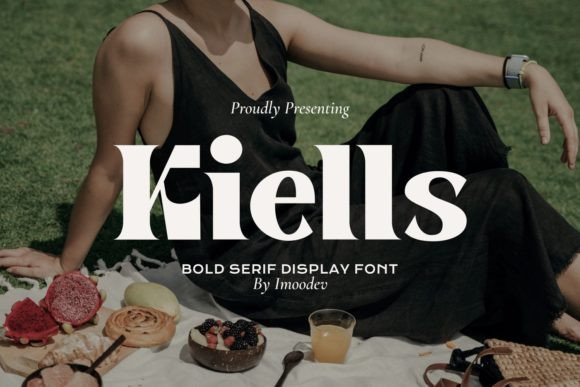
Kiells: A Modern Display Font for Elevating Creative Workflows
Fonts are more than just visual elements—they’re integral to the communication and execution of your message. In a world where digital content is consumed at lightning speed, choosing the right typeface can mean the difference between a design that stands out and one that gets overlooked. Kiells is a modern and elegant display font that has been crafted with both aesthetics and functionality in mind. Whether you're designing a logo, creating social media assets, or producing editorial layouts, Kiells adds a refined touch that complements professional workflows while maintaining creative flexibility.
Understanding Kiells in the Design Ecosystem
Kiells belongs to the category of display fonts, which means it’s best suited for headlines, titles, and short bursts of text rather than body copy. Its clean lines, balanced proportions, and subtle geometric influence give it a contemporary feel without sacrificing readability. This makes it an excellent choice for designers who want to maintain a polished look across their projects while still pushing the boundaries of typographic creativity.
Before integrating Kiells into any project, it's important to understand its role within the broader typography landscape. Display fonts like Kiells often serve as the visual anchor for a design. They help set the tone, evoke emotion, and establish hierarchy. When used correctly, they can enhance user experience by guiding attention and reinforcing brand identity.
Choosing the Right Moment to Use Kiells
- Pre-Project Planning: During the initial stages of a creative project, Kiells can be referenced in mood boards or style guides to define the visual direction early on. This ensures consistency from concept to final deliverable.
- During Execution: As you work on layout designs, Kiells can be applied to key text elements such as headings, pull quotes, or product names. Its versatility allows it to pair well with serif or sans-serif body fonts, ensuring a cohesive aesthetic without clashing.
- Post-Production Touch-Up: If a design feels flat or lacks visual punch, swapping out the headline font for Kiells can instantly elevate the piece. It’s particularly effective when paired with high-quality imagery or minimalist layouts.
Integrating Kiells into Common Workflows
For professionals working in marketing, publishing, or graphic design, Kiells can become a valuable asset in daily tasks. Here’s how it fits naturally into some common workflows:
Marketing Materials and Branding Projects
In branding projects, Kiells can be used to create memorable logos, taglines, or promotional banners. Its modern appeal aligns well with industries such as tech, fashion, and lifestyle. When preparing a brand style guide, include Kiells alongside primary and secondary fonts to ensure team members have clear reference points for usage scenarios.
Example Workflow:
- Define brand personality and visual tone during strategy sessions.
- Select Kiells as the primary display font due to its elegance and clarity.
- Use it consistently across all print and digital collateral, including brochures, websites, and presentations.
- Test compatibility with various platforms and devices before finalizing the brand guidelines.
Content Creation and Editorial Design
Bloggers, educators, and publishers often need fonts that reflect authority and approachability. Kiells works well in editorial contexts for section headers, chapter titles, or featured articles. It brings structure and sophistication to content that might otherwise appear cluttered or unprofessional.
When implementing Kiells in an editorial workflow:
- Use it sparingly for emphasis, ensuring it doesn’t overwhelm the reader.
- Pair it with a readable sans-serif or serif font for body text.
- Ensure color contrast is optimized for legibility and accessibility.
- Review spacing and alignment settings in your design software for optimal presentation.
Business Presentations and Reports
Entrepreneurs and business professionals rely on clear, impactful visuals to convey ideas effectively. Kiells can be a powerful addition to PowerPoint slides, pitch decks, or financial reports—especially when used in charts, infographics, or title slides. The font’s balance between modernity and elegance supports a professional yet dynamic atmosphere.
Tip: When using Kiells in presentations, always consider the audience. For formal reports, keep the use minimal and focused on key data points. For startup pitches or creative agency proposals, let Kiells shine to reflect innovation and thought leadership.
Compatibility and Usability Across Platforms
One of the strengths of Kiells is its broad compatibility. Available in multiple formats (OTF, TTF, WOFF), it integrates seamlessly into popular design tools such as Adobe Photoshop, Illustrator, Figma, Canva, and even web development environments like CSS. Before using Kiells in production, verify that it renders clearly across different operating systems and screen resolutions.
If you’re embedding Kiells into a website, make sure to use appropriate @font-face declarations and test load times. While it’s not recommended for large blocks of text, it performs admirably in smaller, decorative applications. Always check for licensing permissions if you plan to distribute or resell the final product.
Organizing Your Font Library
To maintain efficiency in long-term use, organize Kiells within your font library so it’s easily accessible. Assign it to specific categories like “Headlines,” “Logos,” or “Creative Projects” depending on your needs. This helps avoid confusion and keeps your workflow streamlined, especially when collaborating with others.
Practical Tips for Using Kiells Effectively
Here are a few actionable suggestions to maximize the impact of Kiells in your work:
- Layer with texture: Apply subtle effects like gradients, shadows, or outlines to add depth and dimension to Kiells-based text.
- Balance with whitespace: Because Kiells is bold and expressive, give it room to breathe. Ample whitespace enhances readability and visual appeal.
- Use consistent weights: Ensure that variations in weight (light, regular, bold) are used intentionally to maintain typographic harmony.
- Test on real-world outputs: Print samples or view designs on mobile devices to confirm that Kiells retains its clarity and impact in all contexts.
Real-World Applications
Consider the following use cases where Kiells can make a significant difference:
- Event Invitations: Its sophisticated appearance makes it ideal for weddings, corporate events, or art exhibitions.
- Apparel and Merchandise: Add Kiells to t-shirt designs, mugs, or posters for a stylish and modern look.
- Infographics and Dashboards: Use it to highlight key metrics or categories in data-heavy presentations.
- Book Covers and Titles: Create eye-catching covers for self-published books or zines that reflect a unique personal style.
Maintaining Consistency and Quality Control
Consistency is crucial in any design system. Once you’ve decided to use Kiells in a project, document its specifications in your style guide. Include details like:
- Font size ranges for different applications
- Color codes or palettes it pairs best with
- Recommended line heights and letter spacing
- Examples of correct vs. incorrect usage
Quality control also involves testing Kiells under various conditions. Will it render properly on a client’s phone? Does it scale well in print? These practical considerations should be part of your implementation process. Tools like Font Validator or built-in preview features in design software can help identify potential issues early on.
Long-Term Use and Adaptation
As your projects evolve, so might your font preferences. However, Kiells’ timeless design makes it adaptable across trends and styles. When building a long-term design strategy, consider how Kiells can grow with your brand. Will it remain relevant as your business expands? How does it compare to other fonts in your toolkit?
Periodically review your font choices and assess whether Kiells continues to meet your needs. If it does, reinforce its role through training materials, internal templates, and automated design systems. If not, phase it out gracefully and replace it with a more suitable option, ensuring a smooth transition without disrupting existing content.
Combining Kiells with Other Assets
Kiells doesn’t exist in isolation—it interacts with other design elements. To achieve the best results, consider how it complements your color scheme, image selection, and overall layout. For instance, pairing Kiells with a soft pastel background and minimal photography can create a calming, modern vibe. Alternatively, using it against bold colors or abstract graphics can produce a striking contrast.
Additionally, think about how Kiells will function with voiceovers or animations in video projects. Subtle typographic transitions using this font can enhance storytelling without overwhelming the viewer. Test these combinations early in the pre-production phase to save time and effort later.
Streamlining Adoption for Teams and Clients
If you're introducing Kiells to a team or client, provide clear rationale and examples. Explain why it was chosen over alternatives and demonstrate its effectiveness through case studies or mockups. This builds trust and ensures everyone understands its intended use.
Encourage feedback after implementation. Ask whether the font improves readability, matches the brand voice, or enhances the overall design. Be open to adjusting its application based on real-world responses. Remember, the goal is to support the message—not distract from it.
Training and Onboarding
Include Kiells in onboarding materials for new hires or collaborators. Show them how to install it, access it in design tools, and apply it correctly. Offer cheat sheets or quick-reference guides to reinforce best practices. This reduces the learning curve and promotes efficient use across the board.
Final Thoughts on Implementation
Kiells is a font that blends modernity with elegance, making it a strong candidate for any creative project that requires a touch of refinement. Its usability across platforms and adaptability to various workflows ensure it remains a reliable tool for professionals and hobbyists alike. By understanding where and how to implement it, you can unlock its full potential and contribute to a more cohesive, visually compelling outcome.
Remember, the most effective use of Kiells comes from thoughtful integration. It’s not just about selecting a font—it’s about enhancing the message, guiding the viewer, and reflecting the values of your brand or content. With preparation, testing, and ongoing evaluation, Kiells can become a staple in your design toolkit for years to come.