Ohanlon Bold: A Versatile Display Font for Modern Workflows
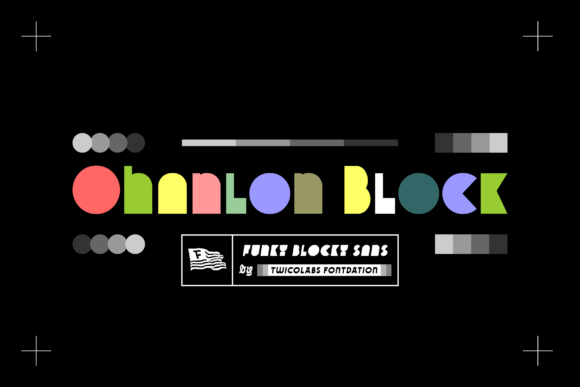
Ohanlon Bold is a display font that stands out with its unique blend of modern and funky aesthetics. Designed to capture attention, it offers a bold and expressive visual identity that can elevate the look of various creative and professional projects. Whether you're working on branding materials, presentations, or digital content, Ohanlon Bold brings a dynamic edge that complements both artistic flair and structured design processes.
What Is Ohanlon Bold and Why It Matters
Display fonts like Ohanlon Bold are typically used for headings, logos, and other focal points where impact is key. Unlike standard sans-serif or serif fonts used in body text, display fonts prioritize style over readability at smaller sizes. Ohanlon Bold fits this category perfectly, offering a strong, confident structure while incorporating playful elements that make it memorable.
In today’s fast-paced digital environment, visual communication plays a crucial role in engaging audiences. Choosing the right font isn’t just about style—it's part of a broader process involving typography hierarchy, brand consistency, and user experience. Ohanlon Bold helps designers and creators make deliberate choices that align with their project goals and aesthetic preferences.
Integrating Ohanlon Bold into Your Workflow
The integration of Ohanlon Bold should be considered at different stages of your creative or business workflow. Here's how it can be used effectively:
Before Starting a Project
When planning a new project—be it a marketing campaign, website design, or print material—it’s wise to consider typography early. Selecting Ohanlon Bold during the initial concept phase ensures that your visual strategy remains cohesive. For example, if you’re designing a logo for a tech startup with a youthful vibe, Ohanlon Bold could serve as an excellent choice for the headline or tagline.
Tip: Create a mood board or sample mockup using Ohanlon Bold to see how it interacts with your color scheme and imagery before committing to it in final designs.
During Design and Development
Once you’ve decided to use Ohanlon Bold, ensure it’s properly installed and accessible across all platforms and tools you work with. Most design software such as Adobe Photoshop, Illustrator, Figma, or Canva supports custom fonts once they're downloaded and added to your system. This compatibility makes Ohanlon Bold easy to implement in both digital and print workflows.
When working on multi-page documents or websites, pair Ohanlon Bold with a more subdued secondary font for body text to maintain readability. This contrast will highlight the importance of headers and titles without overwhelming the viewer.
After Finalizing the Output
After completing your project, consider how Ohanlon Bold contributes to the overall message. Does it enhance the tone? Is it consistent with your brand voice? These questions help determine whether the font supports your intended outcome. In some cases, you may need to test it on different screens or in varying resolutions to ensure it looks good across devices.
For web-based applications, embedding Ohanlon Bold requires proper CSS formatting and licensing compliance. If you're using a self-hosted font file, include it in your site’s assets folder and reference it correctly in your stylesheet. Alternatively, many font libraries offer web embedding options for convenience.
Use Cases for Ohanlon Bold
Ohanlon Bold works well in several contexts due to its boldness and distinct character. Here are a few practical use cases:
- Branding: Ideal for logos, taglines, and promotional banners where you want to establish a strong visual presence.
- Marketing Materials: Adds energy to posters, flyers, and social media graphics, making them stand out in crowded feeds.
- Presentations: Enhances slide titles and call-out sections in decks aimed at young professionals or creative teams.
- Product Packaging: Offers a modern twist to labels, boxes, and packaging that target trendy consumer markets.
- Blog Headers and Titles: Makes blog posts and article titles visually appealing, encouraging readers to engage further.
Pairing Ohanlon Bold with Other Fonts and Tools
One of the most important aspects of using Ohanlon Bold is knowing how to pair it with complementary fonts. Because of its bold nature, it often pairs best with simple, clean typefaces for body copy. Consider pairing it with something like Open Sans or Lato to balance the visual weight between headings and paragraphs.
Additionally, Ohanlon Bold integrates smoothly with popular design and productivity tools. Here are some examples:
- Adobe Creative Suite: Use it in Photoshop for image overlays or in Illustrator for vector graphics.
- Figma and Canva: Import the font directly to streamline your UI/UX or graphic design tasks.
- Microsoft Office: Apply it in PowerPoint slides or Word documents for presentations and reports.
- Email Marketing Platforms: Embed it in newsletters (if supported) to create eye-catching subject lines or headers.
Font Pairing Tips
To maintain harmony in your design, follow these basic rules when pairing Ohanlon Bold:
- Limit the use of similar display fonts to avoid visual clutter.
- Ensure sufficient contrast in color and size between Ohanlon Bold and supporting fonts.
- Test combinations on actual layouts to confirm legibility and visual appeal.
Practical Implementation Strategies
Using Ohanlon Bold effectively means understanding not just its appearance but also how it functions within your specific workflow. Here are a few strategies for seamless implementation:
1. Set Clear Typography Guidelines
If you're managing a team or working on a long-term project, define clear typography guidelines. Include Ohanlon Bold in your list of approved fonts and specify where it should be applied. This ensures consistency and avoids unnecessary rework later in the process.
2. Optimize for Different Mediums
While Ohanlon Bold looks great on high-resolution displays, it might not always render well at low resolutions or on mobile screens. Always preview your designs on multiple devices and adjust the size or spacing if needed to maintain clarity.
3. Use Layers and Styles in Design Software
In tools like Figma or Photoshop, apply Ohanlon Bold as a reusable layer style or font preset. This approach saves time and reduces errors by ensuring the same font settings are consistently applied across your project.
4. Leverage Version Control for Web Projects
When embedding Ohanlon Bold on a website, track changes using version control systems like Git. This practice helps you manage updates and rollbacks efficiently, especially when collaborating with developers or designers.
5. Keep Backups and Organize Assets
Always store a backup of the Ohanlon Bold font file in your project’s asset folder. Organizing fonts with naming conventions (e.g., “Ohanlon_Bold_Header”) helps keep your workspace tidy and improves long-term usability.
Workflow Examples Featuring Ohanlon Bold
Here are two real-world workflow scenarios where Ohanlon Bold can play a central role:
Example 1: Launching a New Product Line
Step 1: During the initial brainstorming session, the marketing team selects Ohanlon Bold for the product name based on its energetic and modern feel.
Step 2: The designer imports the font into Adobe Illustrator and creates a series of logo variations, testing different colors and alignments.
Step 3: Once finalized, the font is embedded into the website prototype using Google Fonts or a custom web font loader.
Outcome: The product launch garners attention due to the bold, eye-catching typography used throughout promotional materials and landing pages.
Example 2: Creating a Personal Brand Website
Step 1: The freelancer reviews their personal brand and decides Ohanlon Bold would reflect their creative personality better than a standard font.
Step 2: They download the font and install it on their local machine, then import it into their preferred website builder like Squarespace or WordPress.
Step 3: They apply Ohanlon Bold to headlines and service titles while using a minimalist sans-serif font for body text and navigation menus.
Outcome: The website has a distinctive, professional look that aligns with the freelancer’s brand and attracts potential clients.
Factors to Consider When Using Ohanlon Bold
Several factors influence how well Ohanlon Bold performs in your work. Understanding these can help you avoid common pitfalls and maximize its value:
Preparation
Before selecting Ohanlon Bold, evaluate its suitability for your audience and platform. Ask yourself: Will this font resonate with my users? Does it support the message I’m trying to convey?
Compatibility
Ensure that the font works well with your operating system and software. Some design platforms require specific file formats like .OTF or .TTF. Also, check for cross-browser compatibility if embedding it on a website.
Usability
Although it’s a display font, don’t use Ohanlon Bold excessively. Reserve it for key elements where it adds the most impact. Overuse can dilute its effect and reduce the overall readability of your content.
Organization
Maintain an organized font library to prevent confusion. Label files clearly and group related fonts together. This step becomes increasingly important as your design toolkit grows.
Efficiency
Use Ohanlon Bold strategically to speed up your design process. Instead of experimenting with too many fonts, focus on one or two that align with your brand and stick with them.
Consistency
Keep your typography consistent across all touchpoints. If Ohanlon Bold appears in your logo, it should also appear in the same context on your website, social media, and printed collateral.
Quality Control
Review your work for any inconsistencies in font usage. Check for missing characters or incorrect weights. These small details can significantly affect the professionalism of your output.
Long-Term Use
Think about how Ohanlon Bold will age with your brand. Will it remain relevant as trends evolve? Choose fonts that have staying power and adapt well to future design updates.
Final Thoughts on Incorporating Ohanlon Bold
Ohanlon Bold is more than just a stylish display font—it’s a strategic tool that enhances visual storytelling and brand identity. Its versatility allows it to fit into diverse workflows, from digital marketing campaigns to educational resources and beyond. By understanding its strengths and limitations, you can use it to create compelling visuals that communicate your message clearly and memorably.
Whether you're a designer, marketer, educator, or entrepreneur, integrating Ohanlon Bold into your work doesn’t require complex steps. With careful planning and thoughtful execution, it can become a valuable asset in your typographic arsenal.